
AC Market APK Download – Latest Version, Installation & Setup Guide
Are you looking for information about AC Market APK Download? AC Market is a name associated with third-party Android application marketplaces. Users searching for AC Market APK generally want to learn how to obtain the application, understand its installation process, check Android compatibility, and explore the setup requirements before using it.
Downloading an APK file is different from installing an application through the Google Play Store. Android users need to pay attention to the file source, device compatibility, security settings, and installation permissions before proceeding.
In this comprehensive guide, we will explain everything about AC Market APK Download, including how APK downloads work, important installation considerations, Android requirements, setup information, and solutions to common download problems. Whether you are a beginner or an experienced Android user, this guide will help you understand the process and make informed decisions.
What Is AC Market APK Download?
AC Market APK Download refers to obtaining the Android installation package associated with the AC Market application.
APK stands for Android Package Kit. It is the standard file format used to distribute and install applications on Android devices.
Unlike applications installed directly through Google Play Store, APK files may be obtained from independent websites or other distribution sources.
AC Market is associated with third-party application marketplace searches, and users often look for its APK to explore its interface and available functionality.
Before downloading any AC Market APK file, users should understand that the authenticity and safety of the file depend on its distribution source. A website displaying the AC Market name does not automatically guarantee that its download is genuine.
Always verify the publisher, file details, and security information before installing an APK.
AC Market APK Download Information
Here is a general overview of the application and its download-related details.
| Information | Details |
|---|---|
| Application Name | AC Market |
| Download Type | APK File |
| File Format | Android Package Kit |
| Platform | Android |
| Application Category | Third-Party App Marketplace |
| Main Purpose | Application discovery |
| Installation Method | Android APK installation |
| Distribution | Third-party sources |
| Compatibility | Depends on the APK release |
| Security | Requires independent verification |
| File Size | Verify from the original source |
| Latest Version | Check verified release information |
Note: Do not rely on unverified version numbers, file sizes, or developer details. Confirm all technical information against a trustworthy distribution source before downloading.
Why Do Users Search for AC Market APK Free Download?
Many Android users search for AC Market APK Free Download because they want to understand whether the application is available without an upfront payment.
However, free availability should not be confused with guaranteed safety or authenticity.
There are several reasons users investigate third-party application marketplaces:
Alternative Application Discovery
Some users want to explore application distribution platforms beyond the traditional app store environment.
Understanding APK Installation
Android APK files allow users to learn about application installation outside the standard app store process.
Exploring Application Categories
Users may be interested in discovering different application categories and understanding how alternative marketplaces organize their listings.
Checking Application Compatibility
Before installing any application, users often want to know whether it supports their Android version and device configuration.
Comparing Distribution Options
Some users compare third-party marketplaces with official app stores to understand differences in availability, security, and application management.
Always check whether an application is genuinely free and avoid websites that use misleading download buttons or unexpected payment requests.
AC Market Download: Important Things to Check BeforeDownloading
Before proceeding with an AC Market download, it is important to verify the APK file and its source.
Downloading an application from an unknown website can expose your device to unwanted software, modified packages, or privacy risks.
Consider the following checks before downloading.
1. Verify the Download Source
Look for reliable information about the website distributing the APK.
Check whether it provides a clear publisher identity, application information, version details, and a trustworthy download process.
Avoid websites with suspicious redirects, excessive advertisements, or misleading download buttons.
2. Check the Application Name
Make sure the file is actually associated with the application you intend to investigate.
A familiar application name or icon is not enough to prove authenticity.
3. Review Version Information
Check the version number and release information before downloading.
Do not assume that a file advertised as the latest version is genuine or officially released.
4. Check Android Compatibility
Different APK files may support different Android versions and device architectures.
Verify the minimum Android requirement before proceeding.
5. Scan the APK File
Use reputable mobile security software to scan the downloaded file.
Security scanning can help identify certain threats, although it cannot guarantee that every APK is completely safe.
6. Review Permissions
Consider whether the application’s requested permissions are appropriate for its functionality.
Avoid granting unnecessary access to sensitive information, contacts, files, or other device resources.
How to Download AC Market APK on Android
Downloading an APK file on Android generally involves accessing a trustworthy distribution source and saving the installation package to your device.
Because the authenticity of AC Market distribution sources must be independently verified, users should not download files from random websites simply because they display the application name.
The general APK download process involves the following considerations:
- Identify a distribution source that can be independently verified.
- Review the application name and publisher information.
- Check the available version and Android compatibility.
- Review the file information and security details.
- Download the APK only if the source and file appear trustworthy.
- Scan the downloaded file before opening it.
Once the APK is downloaded, do not immediately install it without checking its authenticity.
For a complete step-by-step explanation, read our dedicated article: How to Download AC Market APK on Android.
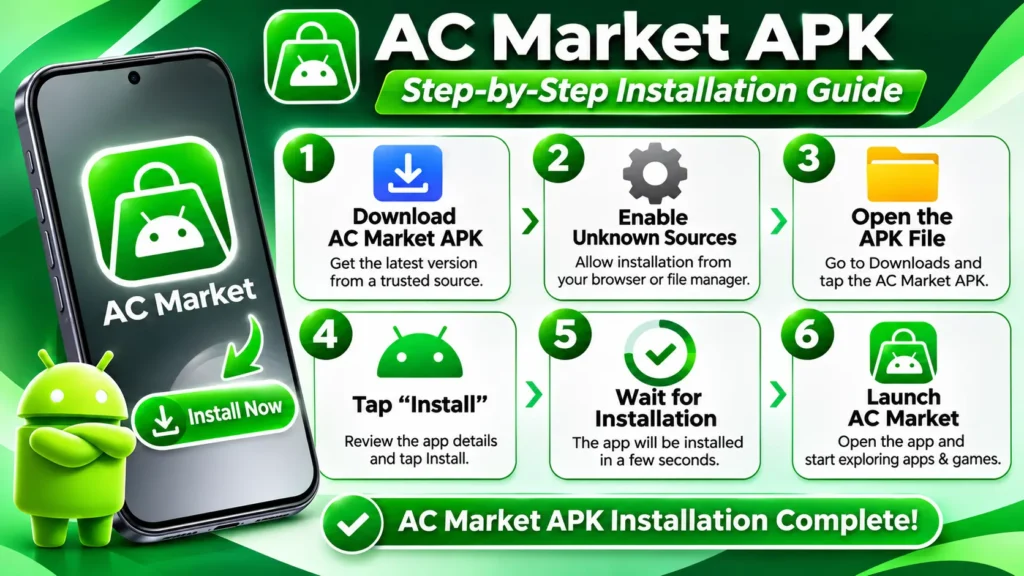
AC Market APK Install: Step-by-Step Guide
After obtaining an authentic and compatible APK file, Android users may need to follow a separate installation process.
The exact process can vary depending on the Android version, device manufacturer, and security settings.
Here is a general explanation of APK installation.
Step 1: Locate the Downloaded APK
Open your device’s file manager or Downloads folder.
Find the APK file you previously downloaded.
Check its filename and file information before opening it.
Step 2: Verify the APK File
Before installation, confirm that the file comes from a trustworthy source.
Scan it with reputable security software and avoid proceeding if your device identifies a potential threat.
Step 3: Review Installation Permissions
Android may ask whether you want to allow a particular application, such as your browser or file manager, to install unknown applications.
This permission should only be considered when you trust the source and understand the risks.
Step 4: Open the APK File
If the APK passes your security checks and is compatible with your device, you can open it to view the Android installation screen.
Review the application information and requested permissions carefully.
Step 5: Complete Installation
Proceed only if the application details and permissions appear legitimate.
If Android displays a security warning, do not ignore it automatically. Investigate the warning before taking any further action.
Step 6: Review the Installed Application
After installation, review the application information through Android settings.
If the application behaves unexpectedly or requests suspicious permissions, uninstall it and investigate the issue.
For more detailed instructions, visit our supporting article: How to Install AC Market APK Step by Step.
How to Enable Unknown Sources for AC Market
Android includes security restrictions that help prevent applications from being installed from untrusted sources.
When installing an APK outside Google Play Store, Android may require permission for the specific application handling the installation.
On supported Android versions, this setting is generally called Install Unknown Apps.
The process may look different depending on the device.
Common steps include:
- Open Android Settings.
- Navigate to Apps or Security settings.
- Locate the special app access section.
- Find Install Unknown Apps.
- Review which application is requesting installation permission.
- Only consider granting permission if you trust that application and the APK source.
On newer Android devices, permission is generally controlled separately for individual applications rather than enabling all unknown installations globally.
For safety, do not grant installation permission to applications that do not need it. Revoke unnecessary permissions after completing a legitimate installation.
Our dedicated guide, How to Enable Unknown Sources for AC Market, will explain this process in greater detail.
AC Market APK for Android: Compatibility and Device Support
AC Market APK is associated with Android application distribution, but compatibility is not guaranteed across all Android devices.
An APK may work on one device and fail on another because of differences in operating system versions, processor architecture, and security configurations.
Before downloading an APK for Android, consider the following factors.
Android Operating System
Check the minimum Android version specified by the authentic application release.
Older operating systems may not support newer application packages.
Device Architecture
Android devices can use different processor architectures.
Some APK packages may be designed for specific hardware configurations.
Available Storage
Make sure your device has enough free storage for the APK and any associated installation files.
Device Security Settings
Android security protections may restrict applications from unknown sources or identify suspicious installation packages.
Do not disable important security features just to force an installation.
Internet Connectivity
A stable internet connection may be necessary when accessing online application listings or downloading installation files.
AC Market APK Latest Download: How to Verify a New Release
Users often search for AC Market APK Latest Download because they want to find the newest available release.
However, the term latest download does not necessarily mean the file is authentic, secure, or officially maintained.
Before considering a newer APK, review the following details:
- Application version number.
- Release date.
- Publisher information.
- File authenticity.
- Android compatibility.
- Available release notes.
- Security scan results.
A trustworthy download source should provide consistent information about the file being distributed.
Avoid websites that advertise different APK versions without explaining where the files originate.
For detailed information about application releases, users can also explore our separate AC Market APK Latest Version guide.
AC Market APK Download Problems and Solutions
Sometimes users encounter problems when trying to obtain or install an APK file.
These issues may be related to the internet connection, browser settings, device storage, file integrity, or Android security restrictions.
Here are some common situations.
1. AC Market APK Download Not Starting
If the download does not begin, the problem may be associated with the browser, internet connection, or website availability.
Possible troubleshooting steps include:
- Check your internet connection.
- Reload the page.
- Check browser download permissions.
- Confirm that the source website is available.
- Avoid repeatedly clicking suspicious download buttons.
2. AC Market APK Download Interrupted
An interrupted download may result from unstable internet connectivity or a problem with the hosting server.
Check your connection and verify whether the file was downloaded completely.
Avoid installing incomplete APK files.
3. AC Market APK File Not Opening
If Android cannot open the downloaded file, possible reasons include an incorrect file format, incomplete download, corrupted package, or compatibility issue.
Check the filename and verify that the file is a genuine APK package.
4. AC Market APK Installation Blocked
Android may block an installation because of security restrictions or a potentially harmful application warning.
Do not bypass a security warning without understanding its cause.
Check the application source and investigate the warning before proceeding.
5. AC Market APK Insufficient Storage
A device with limited available storage may have difficulty downloading or installing applications.
Review your storage settings and remove unnecessary files only when you have confirmed they are safe to delete.
For a complete troubleshooting guide, visit AC Market APK Download Problems and Solutions.
How to Reinstall AC Market APK on Android
Reinstallation may be considered when an application is damaged, repeatedly crashes, or experiences persistent installation-related problems.
However, users should investigate the original issue before removing an application.
Some general considerations include:
Check the Existing Application
Review the installed application’s version and determine whether the problem is related to compatibility or a damaged installation.
Consider Your Application Data
Uninstalling an application may remove locally stored data.
Back up important information where possible before proceeding.
Verify the Installation File
If you need to reinstall an APK, make sure the replacement file comes from a trustworthy source.
Check Security Information
Scan the replacement file and review its permissions before installation.
Review the Result
After reinstalling, check whether the original issue has been resolved.
If the application continues to behave unexpectedly, stop using it rather than repeatedly installing files from unknown websites.
Our separate article, How to Reinstall AC Market APK on Android, will cover this subject in more detail.
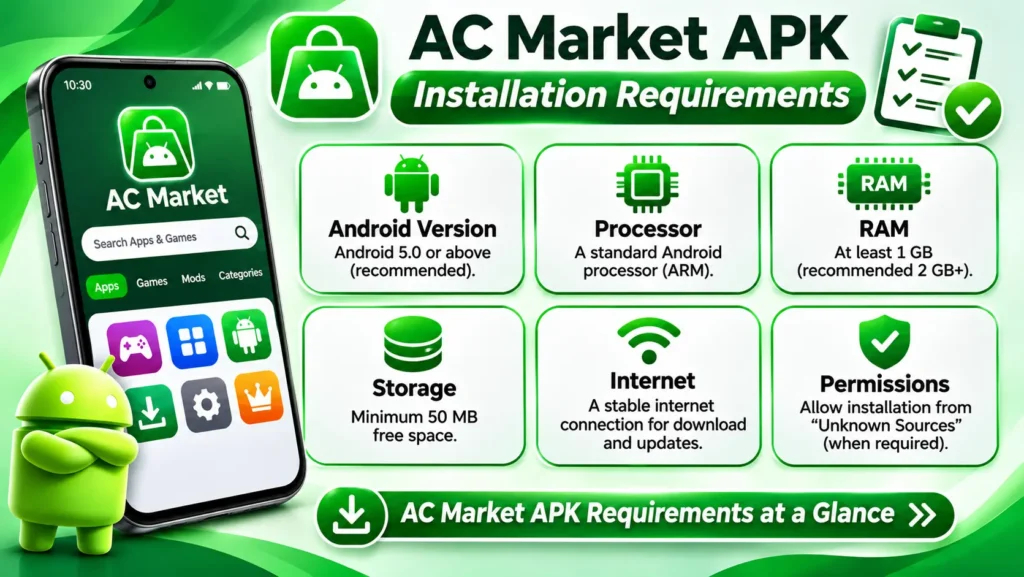
AC Market APK Installation Requirements
Before installing an APK file, users should understand the basic requirements that may affect installation.
The exact requirements for AC Market must be confirmed from a reliable application release.
Here are the general requirements to consider.
| Requirement | What to Check |
|---|---|
| Operating System | Supported Android version |
| Storage | Sufficient free device storage |
| APK File | Authentic and complete package |
| Internet | Stable connection when required |
| Security | Reputable malware scanning |
| Permissions | Appropriate application access |
| Architecture | Compatible processor architecture |
| Device Settings | Android installation permissions |
There is no reason to assume a specific RAM requirement, file size, or minimum Android version without verified technical documentation.
Read our supporting article AC Market APK Installation Requirements for a more detailed explanation.
AC Market APK Download vs Google Play Store
There are important differences between obtaining an APK file from a third-party source and installing an application through Google Play Store.
| Comparison | AC Market APK Download | Google Play Store |
|---|---|---|
| Distribution | Third-party sources | Official Google platform |
| Installation | APK installation process | Integrated installation |
| File Verification | Depends on source | Google Play security systems |
| Updates | Depends on distribution source | Integrated update support |
| Security | Requires independent checks | Play Protect and other protections |
| Compatibility | Depends on APK package | Device and app compatibility checks |
| Support | Depends on provider | Google support resources |
For most Android users, Google Play Store is the recommended option because it provides an established application distribution system and integrated security protections.
Users considering third-party APK files should carefully evaluate the source and potential risks.
Common Mistakes to Avoid During AC Market APK Download
Downloading and installing APK files requires attention. Some common mistakes can create unnecessary security and compatibility problems.
Downloading from Unknown Websites
Avoid websites that do not provide reliable information about the APK file or its publisher.
Ignoring Security Warnings
Android security warnings should be investigated rather than automatically dismissed.
Installing Incompatible Files
Always verify the minimum Android version and processor architecture when this information is available.
Trusting Fake Download Buttons
Some websites display misleading advertisements that look like actual download links.
Use caution when interacting with download pages.
Granting Unnecessary Permissions
An application should not receive access to personal information or device functions without a legitimate reason.
Installing Every Advertised Update
A website claiming to provide the newest version does not guarantee authenticity.
Always verify the release before installing it.
Frequently Asked Questions About AC Market APK Download
1. How Can I Download AC Market APK?
First, identify a trustworthy distribution source, verify the application’s information, check compatibility, and scan the APK before considering installation.
2. Is AC Market APK Free to Download?
The availability and pricing depend on the distribution source. Verify any payment requirements and avoid misleading download offers.
3. Can I Install AC Market APK on Android?
APK files are designed for Android devices. However, whether a particular AC Market release can be installed depends on its authenticity, compatibility, and device requirements.
4. Why Is AC Market APK Not Installing?
Possible reasons include corrupted files, insufficient storage, incompatible Android versions, package conflicts, or security restrictions.
5. Do I Need to Enable Unknown Sources?
Android may require permission to install applications from a particular source outside the official app store. This permission should be granted only when necessary and only to a trusted source.
6. Is AC Market APK Latest Download Safe?
A file advertised as the latest version is not automatically safe. Verify its source, publisher, version information, and security status.
7. Can I Reinstall AC Market APK?
Reinstallation may be possible if a compatible and authentic APK is available. Always consider data loss and verify the replacement file before installing it.
8. Does AC Market APK Work on Every Android Device?
No. Compatibility depends on the APK release, Android version, processor architecture, and device configuration.
9. What Should I Do If the AC Market APK Download Fails?
Check your internet connection, browser settings, available storage, and the source website. Avoid downloading replacement files from suspicious sources.
10. Is AC Market APK Better Than Google Play Store?
They are different distribution options. Google Play Store is generally recommended for most users because of its established security systems and official application distribution.
Final Thoughts
AC Market APK Download is a common search topic among Android users interested in learning about alternative application marketplaces and APK installation.
Understanding the download process, Android compatibility, installation permissions, and security requirements is important before considering any third-party APK file.
Throughout this guide, we have covered the essential aspects of AC Market download, including file verification, APK installation, unknown app permissions, troubleshooting, and device requirements.
Remember that downloading an APK from an unknown source can expose your device to security and privacy risks. Always verify the file, review permissions, and keep Android security protections enabled.
For most users, official application stores remain the preferred option for obtaining verified applications. If you are considering a third-party APK, take the time to research its source and compatibility before proceeding.